
My little WordPress blog gets a small, steady trickle of readers from search engines. In the last two months, it also got thousands of attacks.
I never thought anyone would bother. There is no shop, no user data worth stealing, and only one real comment in three years. But when I finally sat down with the server’s access logs, the picture was very different. This post walks through what I found, what it means, and what I changed.
The site and the method
The site is a small WordPress blog on ordinary shared hosting, with articles from 2023 to 2025. Two of them carry most of the traffic, each with roughly 1,100 to 1,200 visitors over the period, some of them crawlers.
I looked at the Apache access logs from 3 August to 3 October 2026 and analyzed them locally with GoAccess. No tracking scripts, no security plugin dashboards: just the raw requests the server received. All numbers below are rounded.

Requests (blue) and unique visitors (red) per day. The blue spikes are bursts of automated traffic.
On average the site served about 580 requests a day. On 27 September it got 2,460, more than four times as many, with similar bursts on 9 August and 12 September. Real readers don’t arrive like that; bots do.
Comment spam: every single day since July 2024
The loudest attacker was comment spam: about 2,600 automated comment submissions in two months. Over the blog’s lifetime, the database had collected at least 30,153 comments flagged as spam. In the same time, it received exactly one real comment, in 2023.
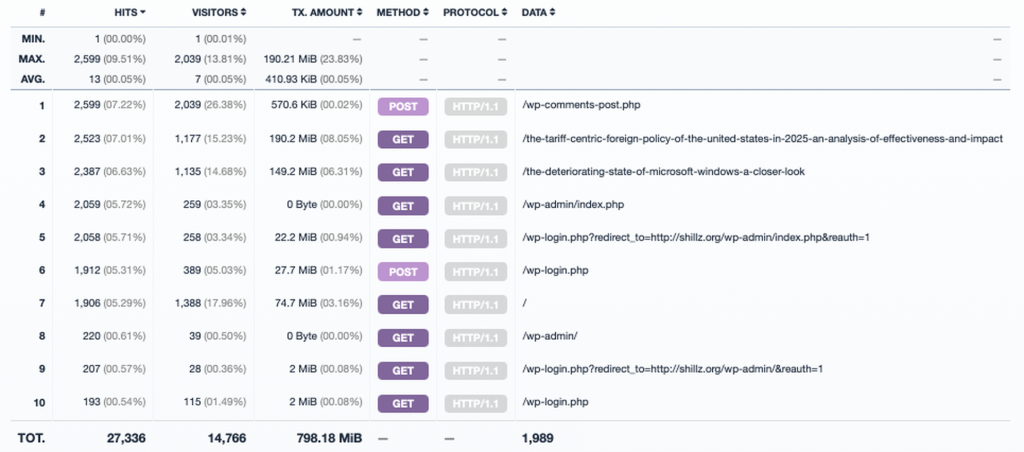
The most-requested URLs, 3 August to 3 October 2026. The comment form tops the list, ahead of my most popular article, and the admin and login pages take six of the top ten spots.
The most-requested address on my blog wasn’t an article; it was the comment form. Those 2,600 submissions came from about 2,000 different visitors in GoAccess’s count, so this wasn’t one bot but a swarm.
The first spam comment arrived in March 2023, eight weeks after launch. It was a line of keyboard mashing. For a year it stayed a trickle of a few dozen a month. Then, in summer 2024, it turned into a flood. Since 1 July 2024 there hasn’t been a single day without spam: 825 days in a row, about 36 a day, peaking at 2,009 in July 2025. The bots work around the clock; every hour of the day gets roughly the same amount.
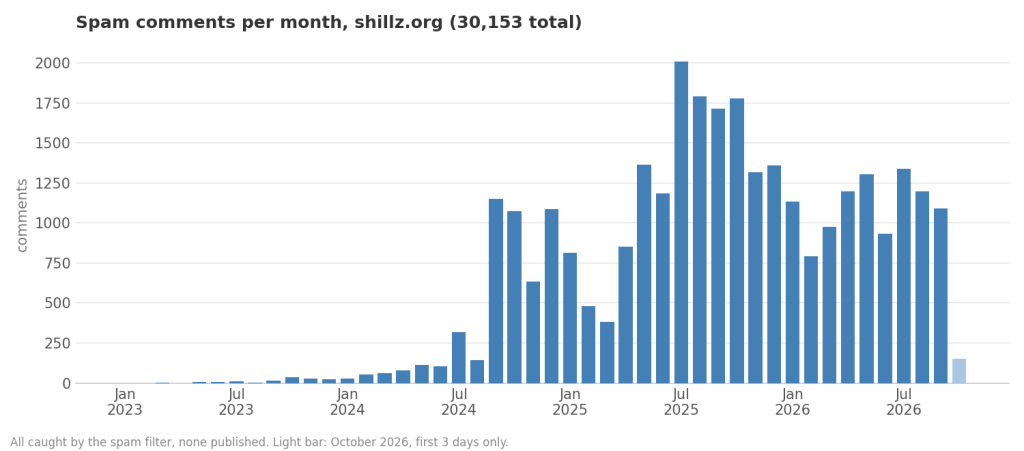
Comments flagged as spam per month. The light bar is October 2026, which covers only three days.
Almost all of it, 94%, landed on just three posts. And once the bots found a post, they kept coming back: one post from December 2023 collected spam for almost three years. 10,000 comments, to be exact.
What were they selling? Mostly fake diplomas and school certificates (30%), then online casinos and betting (19%), then local services like renovation and towing, and home detox for alcoholics. The diploma wave made up 70 to 80% of all spam from mid-2024 into early 2025, and has since disappeared; in 2026, gambling leads. 71% was in Russian, only 9% in English.
It’s mass-produced, but not copy-paste. The 30,153 comments came from 27,812 different “names”, usually a keyword plus four random letters. 99% carried at least one link, one of them 252, pointing to more than 11,600 different domains; almost 7,000 of those appeared exactly once. The English ones were the friendliest: “very good”, “awesome”, “thanks for the article”. Seventeen even greeted the site by name: “Good article Shillz”.
Antispam Bee caught all of them, and not a single one was published. Deleting them shrank the database from 32 MB to 14 MB.
Guessing passwords, and first guessing who to log in as
The second big pattern was password guessing: about 1,900 login attempts, plus around 2,000 requests poking at the admin area. These are bots working through lists of common and leaked passwords, hoping one fits.
Before guessing a password, a bot needs a username. WordPress is surprisingly willing to hand those out. A request like ?author=1 redirects to an author page named after the user, and the REST API can list users too. My logs were full of bots walking through these, one user number after another. Login guessing and username discovery go hand in hand, so blocking only one of them is half a fix.
The quiet one: application passwords
The most interesting attempt was also the quietest. On 2 October, something tried to create application passwords for user IDs 2 through 9. Application passwords are a WordPress feature that lets apps and scripts log in through the API, separately from your normal password. If an attacker can create one, they get a permanent back door that survives a password change.
Creating one normally requires being logged in as that user, so the bot was most likely hoping for a misconfiguration or a vulnerable plugin. On my site it didn’t even get that far, for a slightly embarrassing reason: the site had no HTTPS yet, and WordPress disables application passwords without it. My missing certificate accidentally protected me. I’ve since switched the site to HTTPS and turned the feature off entirely, since nothing on the blog uses it.
Scanners looking for secrets
A steady background of scanners didn’t care that the site runs WordPress at all. They asked for files that should never be public: .env files with passwords, cloud keys like serviceAccountKey.json, and leftover copies of the WordPress config file such as wp-config.php.bak or editor backup files ending in ~ or .swp. One forgotten backup file can expose a database password, and these bots check every site they find for exactly that.
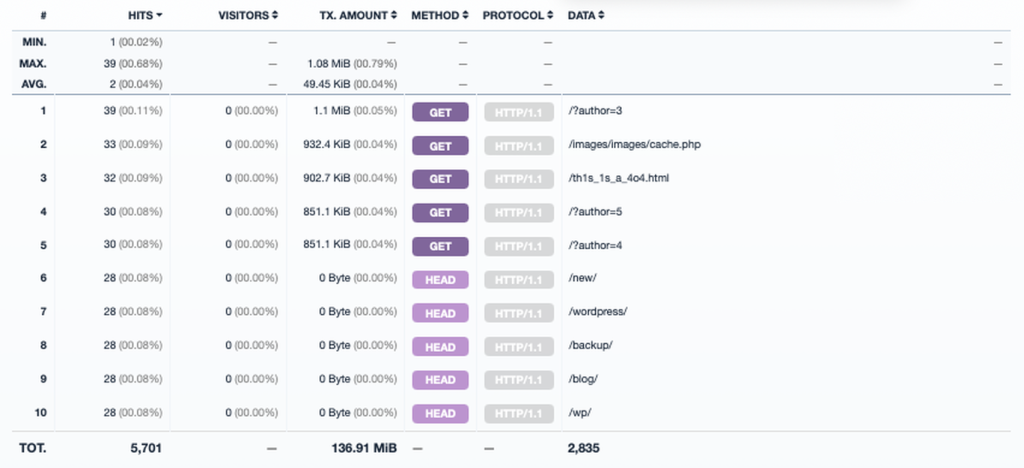
The top ten of 2,835 different missing pages bots asked for, totalling about 5,700 requests.
The top of the list shows the same habits. Bots walk through user numbers (?author=3, 4, 5), knock on folders where a forgotten second WordPress install or a backup might live (/wordpress/, /backup/, /new/), and ask for files like cache.php that are typical names for back doors left by earlier attackers. Even the odd th1s_1s_a_4o4.html has a purpose: by requesting a page that can’t exist, a scanner learns what the site’s “not found” answer looks like, so it can spot real hits later.
Further down, the list gets more pointed: requests for .env files, and for wp-admin/install.php inside folders like /wp/, /wordpress/ and /old/. That last one hunts for a WordPress copy that was uploaded but never set up. Whoever finds one can finish the installation themselves and run their own code on your server.
Then there was the junk. Referrer spam made fake sites appear as visitors’ sources in my stats, hoping I would click. Bursts of scanner traffic also caused most of my server errors: the host’s rate limiting answered them with 503s, and bots calling WordPress’s internal files directly caused 500s. In two months, only two errors on real pages remained unexplained. Reading errors next to the requests that caused them saved me from chasing problems that weren’t there.
What I changed
My rule of thumb was simple: anything the site doesn’t use gets turned off, and anything it does use gets an extra lock. In practice that meant:
- A backup and a clean bill of health first. Before touching anything, I made a full backup and checked that WordPress and its plugins were unmodified.
- HTTPS everywhere, including the admin area.
- An extra lock on the login page, so bots never even reach the WordPress password form.
- Comments off. With one real comment in three years, they cost far more than they brought in.
- No more handing out usernames through author pages or the API.
- Unused features off: application passwords, the old XML-RPC interface, and in-dashboard file editing.
- Less code overall. I removed plugins and themes I no longer used, along with Google Analytics, since the server logs already tell me what I need.
- Automatic updates for WordPress, plugins and themes.
What I’d tell anyone with a small WordPress site
You are not too small to be attacked. None of this traffic was aimed at me personally; bots try every site they can find, because trying is free.
- Read your access logs once. A free tool like GoAccess turns them into a readable report in minutes, and you’ll know what you’re actually dealing with.
- Turn off what you don’t use. Every feature, plugin and open form is something a bot can knock on.
- Protect the login page and hide your usernames. Password guessing needs both, so take both away.
- Keep backups and config copies out of the web folder. Scanners check for them on every site.
- Update automatically. Most WordPress break-ins use holes that were already fixed.
I’ll check the logs again in a few weeks to see whether the changes worked, and write a short follow-up with the numbers.
Written with help from Claude. All numbers come from my own server logs and database.